

RenPy是一个基于阉割版Python的galgame制作工具,并且工具里自带一个教程向的galgame和一个参考用的超短篇galgame示例。由于其内置一个Python,其制作的自由度非常高。在其中,有一类叫作custom_text_tag的工具,可以在对话里插入特定标签。我们使用这一标签来实现插入Latex。先给各位看看效果图吧。
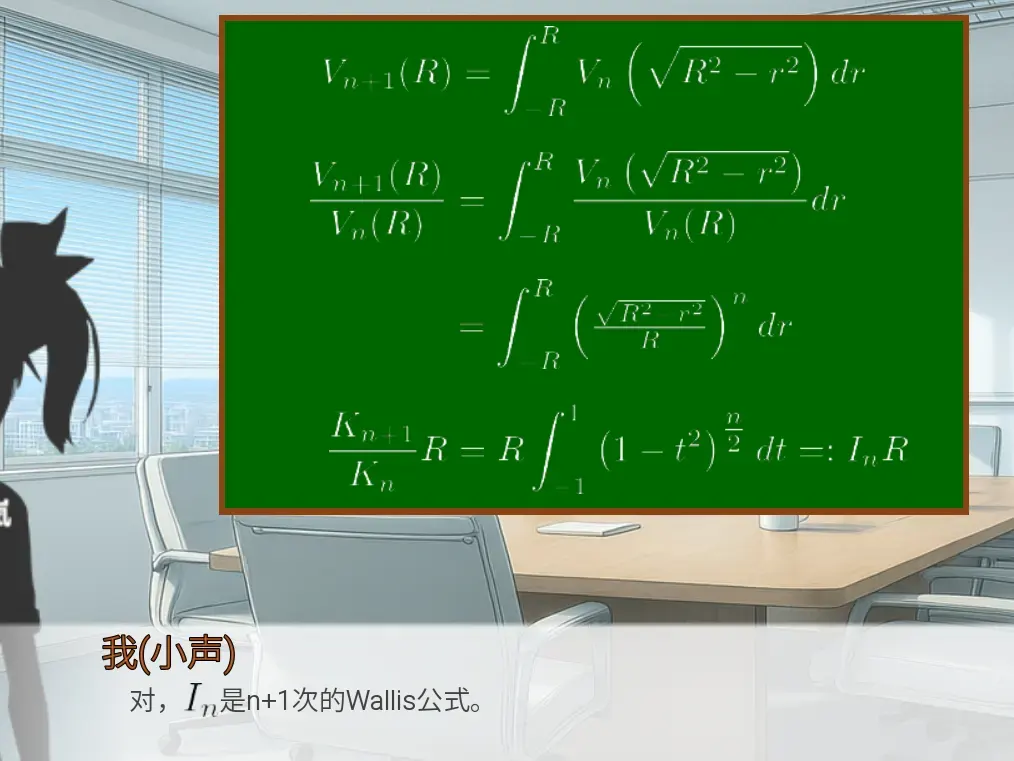 可以看到,下面对话里插入了一个类似公式图片的东西。当然,上面黑板上也有这个东西。实际上黑板则是我自己写的screen类的一个子类,里面也是用的text里插入标签来实现的。给大家先看看代码,然后再看背后的实现吧——
    # 这是黑板的调用代码
    show screen blackboard([
        "{tex}\\color{{white}{{V_{{n+1}(R)=\\int_{{-R}^R\
        V_n\\left(\\sqrt{{R^2-r^2}\\right)dr}{/tex}",
        "",
        "{tex}\\color{{white}{{\\frac{{V_{{n+1}(R)}{{V_n(R)}=\\int_{{-R}^R\
        \\frac{{V_n\\left(\\sqrt{{R^2-r^2}\\right)}\
        {{V_n(R)}dr}{/tex}     ",
        "",
        "   \
        {tex}\\color{{white}{{=\\int_{{-R}^R\\left(\
        \\tfrac{{\\sqrt{{R^2-r^2}}{{R}\\right)^ndr}{/tex}",
        "",
        " \
        {tex}\\color{{white}{{\\frac{{K_{{n+1}}{{K_n}R=R\\int_{{-1}^1\
        \\left(1-t^2\\right)^{{\\tfrac n2}dt=:I_nR}{/tex}"
    ]) as bd onlayer master zorder -1
    # ……
    # 这是对话的代码
    Character("我(小声)", color=brown) "对,{tex=8}I_n{/tex}是n+1次的Wallis公式。"
第一步:下载TyniTex(最终只有300MB)
在 https://github.com/rstudio/tinytex-releases 中下载 TyniTex-1 on Windows in 2026,
把这个包给解压到项目文件的game文件夹下。
然后在TinyTeX\bin\windows下使用cmd命令——
(下面不是renpy,而是cmd。但选项里不给选没办法)
tlmgr install amsmath amssymb graphics来安装对应的包。(为什么就1行的代码会占这么大块?)
第二步:开始具体的代码。
为了方便,我创了一个latex.rpy来存档相关功能。项目文件夹里的rpy文件可以直接相互调用,不用include或者import。
具体思路是,定义一个存储公式图片的缓存文件夹(下面代码中是game/cache/latex_formulas),然后利用hash把公式给转化为Windows下合法的文件名,接着调用TyniTex来生成图片,然后在tex_tag中,利用图片地址和缩放比例来返回图片。相关的建议先看看RenPy的文档,看一下costum_text_tag怎么用。
init python:
    import os
    import subprocess
    import hashlib

    # TinyTeX 根目录(相对 game 目录)
    LATEX_ROOT = os.path.join(renpy.config.gamedir, "TinyTeX")
    # 公式缓存目录
    CACHE_DIR = os.path.join(renpy.config.gamedir, "cache", "latex_formulas")
    # 公式渲染默认参数

    LATEX_BIN = os.path.join(LATEX_ROOT, "bin", "windows", "latex.exe")
    DVIPNG_BIN = os.path.join(LATEX_ROOT, "bin", "windows", "dvipng.exe")

    default_fontsize = 7
    usual_fontsize = 10

    def latex_formula_path(code):
        hash_key = hashlib.md5(f"{code}".encode("utf-8")).hexdigest()
        output_pic = os.path.join(CACHE_DIR, f"formula_{hash_key}.png")
        print(code)
        return hash_key, output_pic

    def latex_formula_pic(code):
        hash_key, output_pic = latex_formula_path(code)
        if os.path.exists(output_pic):
            return output_pic

        # LaTeX 源码模板(无需用户加 $ 符号)
        # 正式版会注释掉这段代码,并移除掉约300M的TyniTex-1 on Windows in 2026
        # https://github.com/rstudio/tinytex-releases
        # 如果缓存图片丢失,可能需要用户下载这个,然后解除下面的注释(将gallery_files.rpy中的on_testing设置为True)
        # 在TinyTeX\bin\windows下使用cmd命令
        # tlmgr install amsmath amssymb graphics
        # 来安装基础包
        if on_testing:
            tex_template = r"""
            \documentclass{{article}}
            \usepackage{{amsmath,amssymb,color}}
            \pagestyle{{empty}}
            \everymath{{\displaystyle}}
            \begin{{document}}
            ${code}$
            \end{{document}}
            """.format(code=code)

            temp_tex = os.path.join(CACHE_DIR, f"temp_{hash_key}.tex")
            temp_dvi = os.path.join(CACHE_DIR, f"temp_{hash_key}.dvi")

            with open(temp_tex, "w", encoding="utf-8") as f:
                f.write(tex_template)

            try:
                # 编译为 DVI
                subprocess.run(
                    [LATEX_BIN, "-interaction=nonstopmode", "-output-directory", CACHE_DIR, temp_tex],
                    check=True, stdout=subprocess.PIPE, stderr=subprocess.PIPE
                )

                # 透明PNG
                subprocess.run(
                    [
                        DVIPNG_BIN,
                        "-D", "300",
                        "-bg", "Transparent",
                        "-T", "tight",
                        "-o", output_pic, temp_dvi
                    ], check=True, capture_output=True
                )
            except subprocess.CalledProcessError:
                return None
            finally:
                # 清理临时文件
                for ext in [
                    ".tex",
                    ".dvi",
                    ".aux",
                    ".log"
                ]:
                    f = temp_tex.replace(".tex", ext)
                    if os.path.exists(f):
                        os.remove(f)
        return output_pic

    def tex_tag(tag, argument, contents):
        if len(contents)==0:
            return ""
        # 渲染公式
        img_path = latex_formula_pic(contents[0][1])
        if not img_path:
            # 渲染失败
            print("Not img_path")
            return [(renpy.TEXT_TEXT, "渲染失败")]
        if argument:
            scale = int(argument) / usual_fontsize
        else:
            scale = default_fontsize / usual_fontsize
        img = im.FactorScale(Image(img_path.replace("\\", "/")), scale)
        return [(renpy.TEXT_DISPLAYABLE, img)]

    # 注册custom_text_tag,在text中能使用tex标签调用
    config.custom_text_tags["tex"] = tex_tag
以上就是我的代码。注释懒得写太多(而且因为缺少资料,我还是在AI帮助下写出来的。但AI经常写错的东西,还得我自己调。这里就为大家省去了慢慢调教的过程了)。
如果有兴趣,还是可以看看里面的具体内容。毕竟上面代码有些是为了我这边而调整的,例如缓存地址的设置,还有那个on_testing(因为最终会移除掉那300MB的TyniTex,如果用户不小心删了缓存里的图片,利用设置on_texting=False,就可以在不报错的情况下,直接返回一个“渲染失败”来告诉用户,而不是直接游戏中断;相当于是注释的作用)之类的。
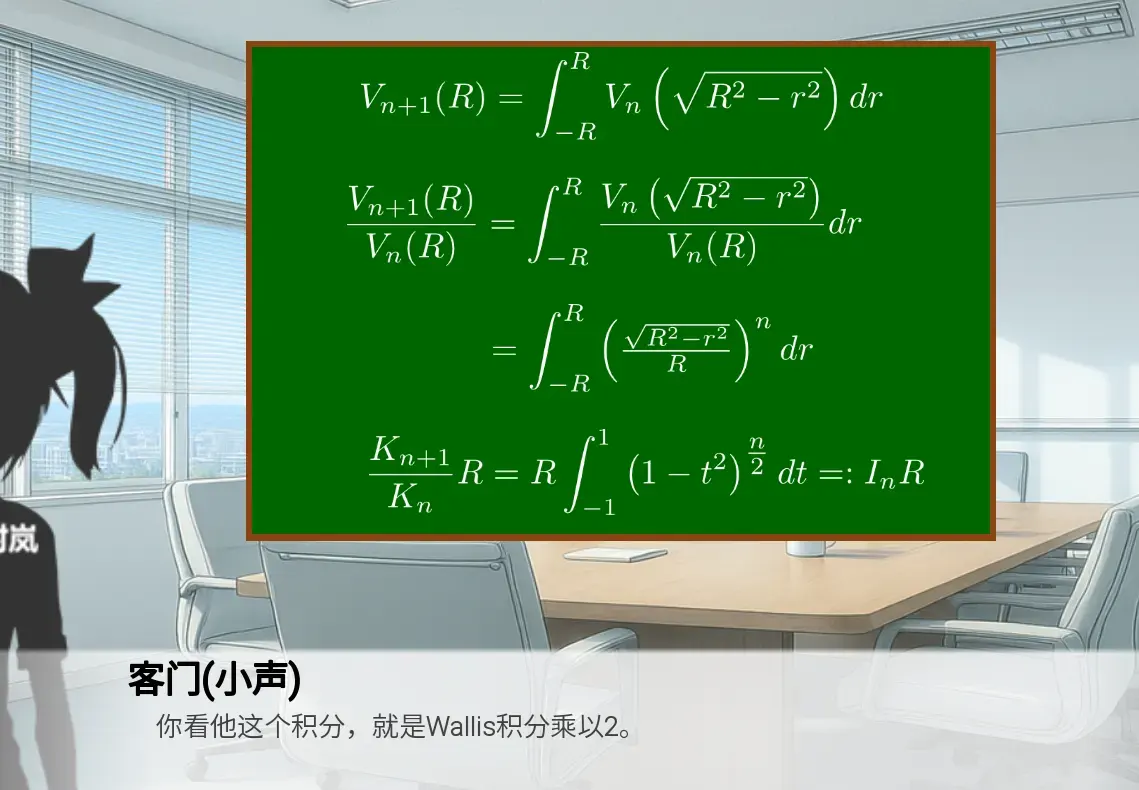 比之前清晰多了。
1 条回复